

Many love reliving old games, but they often lack the fluidity they currently possess due to latency. RetroArch offers a new setting, “Run Ahead,” that revamps these classics, giving them a responsiveness they didn’t have before.
This feature optimizes responsiveness in games like Super Mario World, being useful for older titles that were previously avoided due to their slowness. For games with high input lag, “Run Ahead” is a critical feature. While it doesn’t change the overall appeal, it is valuable for retro fans. For example, in Super Mario World, Mario takes one frame to jump; “Run Ahead” eliminates that delay, improving an already good game.
When enabled, “Run Ahead” simulates and calculates frames before they appear. It processes inputs just before you make them. Thus, the extra lag in games is calculated in advance. This makes control more responsive; each game requires a different calculation, but the benefits are the same: poor controls are improved. This applies not only to platformers, but also to fighting or racing games that require precise timing.
Setting Run Ahead in RetroArch
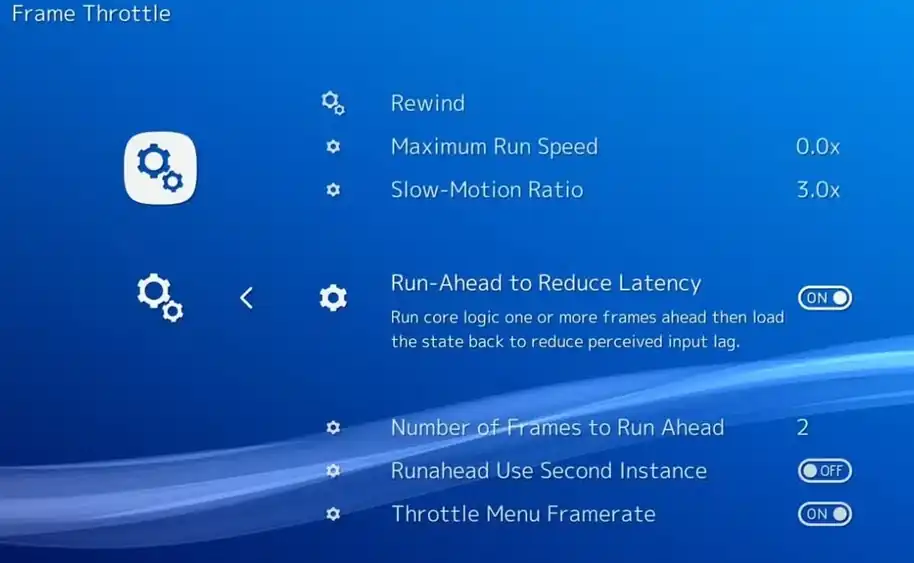
Settings -> Frame Throttle -> Run Ahead to ON, and for the other options:
Each game has a unique input delay. To take advantage of Run Ahead, you need to find the right value. To calibrate it in RetroArch, follow these steps:
- Stand in the game in RetroArch.
- Record an input by pressing a button on your controller.
- Observe the frames. Advance the emulation frame by frame and count how many frames it takes for the action to register on screen.
- Calculate the value. The number of frames it took to register is the normal latency value. Subtract 1 from that number to get the optimal value to enter in the Run Ahead settings.
After adjusting, the settings simulate the necessary frames, giving immediate action. You won’t see a delayed response.
Tip: An incorrect value can even increase the delay. Finding the right balance is a bit tricky.
Other RetroArch features for reducing lag include “Run Ahead.” With the right settings, an old game will feel modern.
Do you have any questions or problems related to the topic of the article? We want to help you.
Leave a comment with your problem or question. We read and respond to all comments, although sometimes it may take a while due to the volume we receive. Additionally, if your question inspires the writing of an article, we will notify you by email when we publish it.
*We moderate comments to avoid spam.
Thank you for enrich our community with your participation!