

There are several users complaining about their Smart TV image not looking right. They indicate dull colors, blurry action scenes and low brightness that doesn’t meet the expectations of the product. But it may be the case that your Smart TV setting is in Save Energy Mode.
The Save Energy Mode in a Smart TV setting menu is similar to the Save Battery mode of Smartphones. It was created to reduce energy consumption though it sacrifices image quality. An environmental friendly feature that may worsen the visual experience with your Smart TV.
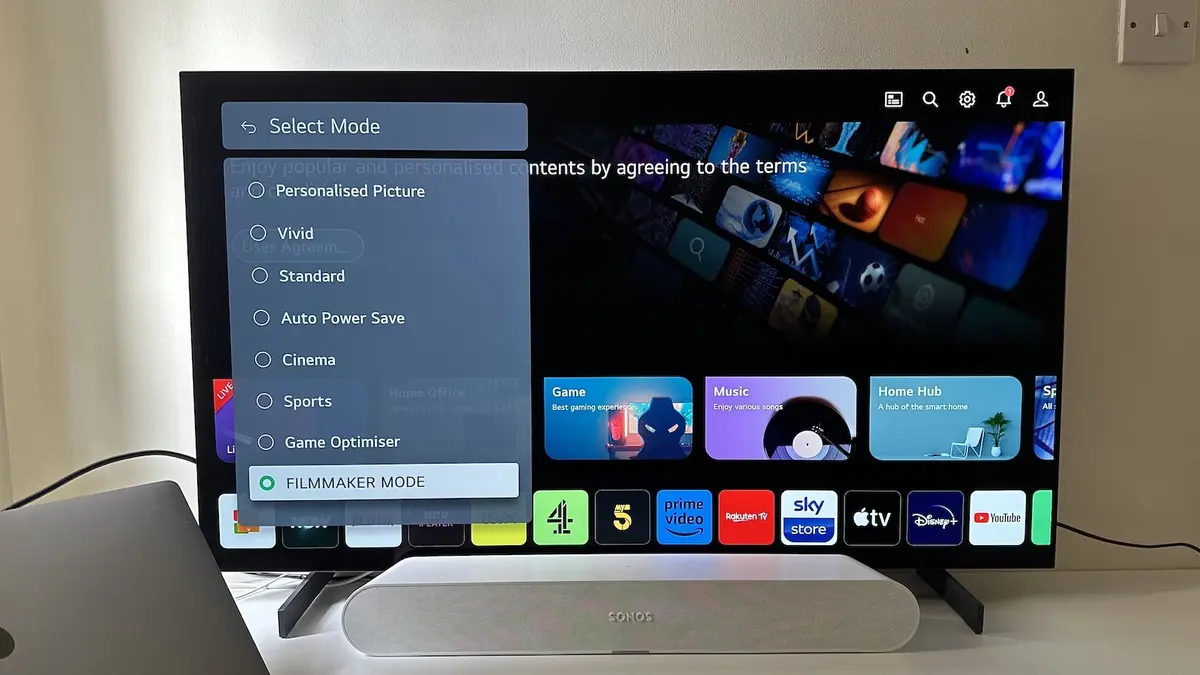
Smart TV setting for saving energy, how does it work?
If you have the Save Energy mode activated on your Smart TV setting the screen brightness adjusts itself automatically. It also limits the HDR, balances contrast and gamma and reduces the refresh rate. All these changes help the TV set to lower electricity consumption. On the other hand, the image gets darker and less definite.
You can notice it when watching a movie, for example it will lose intensity in key scenes or a soccer match that looks blurrier than usual. A very colorful series may also look pale and luminous environments will suffer the most for Save Energy mode setting.
The most curious aspect of this Smart TV setting is that several manufacturers enable it from factory. On the recent past, there was a so called Store Mode that worked exactly the opposite. But now the trend is to set Smart TV setting to Save Energy mode to lower resources consumption. To sum up, there are thousands of users that don’t know what their Smart TV can really show them in terms of quality. However, you can turn it off with just a simple menu option.
When to use it
It’s important to understand that Save Energy mode setting in a Smart TV models is a good feature to use in certain moments. For example, news, chat and static programs won’t suffer from color change. You won’t even notice the difference and you will save electricity.
On the other hand, if you want to watch a movie or series in HDR or sport events, you should disable the Save Energy mode. There are also more balanced options, where you indicate a full brightness level and let the environmental light sensor adjust intensity according to the light of the room.
Another good resource is customizing saving energy depending on your movement. It can reduce the electricity consumption in static scenes without affecting fluency in sports or videogames. It’s better to learn how to use it instead of just turning it off or on for long periods of time.
Selling pretext for Smart TV manufacturers
Energetic effiency has become a top priority for TV manufacturers. The main reason is pressure from European regulations and there’s also a marketing motive. You will find the Save Energy mode as an added value for certain Smart TV models. You can save electricity, help the environment and make your TV more sustainable all in one.
The truth is that energy saving exists but you should also put it into context. The TV doesn’t consume as much electricity as other home appliances and the real impact on your bill will be limited. When using this mode, you resign the full image quality of a TV set that you paid several Euros for.
There are some cases where you may prefer the Save Energy mode Smart TV setting. For example, in OLED panels that last longer if you use lower brightness. In darker rooms you can also reduce visual fatigue with this feature, but it’s still better to adjust the parameters manually instead of a generic profile.
The key element is for the user to understand what happens with the Smart TV and then choose the customization settings. You can check the menu and test the different profiles until find the perfect balance between a maximum brightness panel and a colorless image.
Smart TV manufacturers are aware of the dilemma and work in more intelligent systems capable of adjusting image in real time thanks to advanced sensors. They are even introducing Artificial Intelligence. The final objective is to create hybrid profiles with a Smart TV setting capable of saving energy without compromising image quality.
Right now, people don’t want to pay more on the electricity bill, but they don’t buy the latest Smart TV for a brightless and colorless image either.
Do you have any questions or problems related to the topic of the article? We want to help you.
Leave a comment with your problem or question. We read and respond to all comments, although sometimes it may take a while due to the volume we receive. Additionally, if your question inspires the writing of an article, we will notify you by email when we publish it.
*We moderate comments to avoid spam.
Thank you for enrich our community with your participation!