
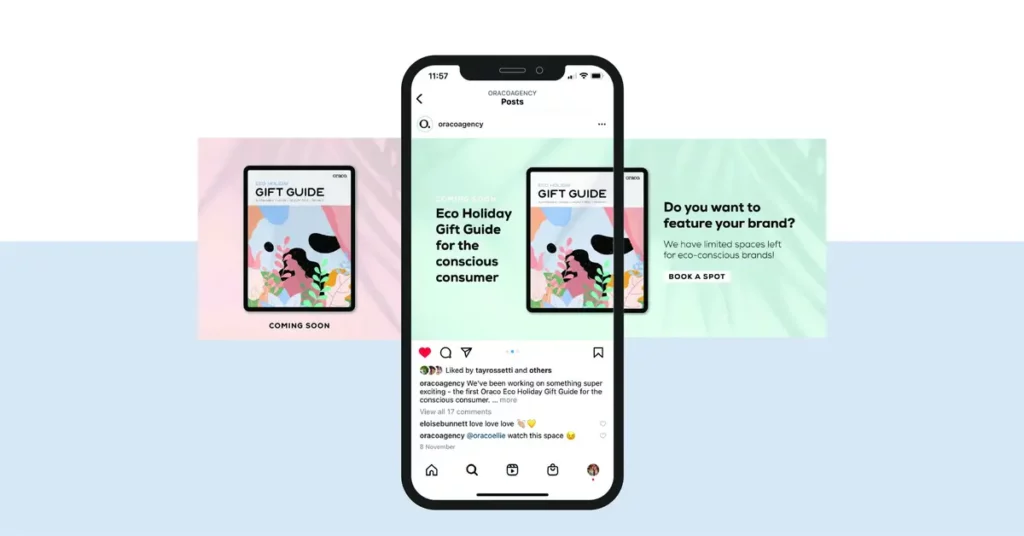
If you use Instagram regularly you may find that certain posts look like an individual photo that deploys little by little. This is an Instagram continuous carousel and it’s one of the most curious and useful posts to increase your followers in an original way.
The carousel is a set of images that are displayed to engage and make the users watch them all. It’s not that hard to make an Instagram continuous carousel and you can follow the indications in this post to create yours.

What is a continuous carousel in Instagram?
This type of post brings together up to ten images designed to fit together. When you swipe your finger it seems like the photo doesn’t finish but extends to the next one. This carousel is continuous as you can follow it up to the end of the gallery. There are several examples of how to use a continuous carousel in Instagram to increase users engagement.
- A panoramic scenery that opens slowly.
- An infographic explaining step by step processes.
- A list of products sharing the same design.
The continuous carousel in Instagram is a tool that turns typical photos into an interactive set of images. They work together to offer a different experience as well as unique.
Why does it work so well?
- The continuous carousel is not only nice looking, it also arouses the spectators interest.
- It increases visualization time and it’s a good thing for your account algorithm.
- It gives a message of creativity and professionalism to highlight your account over the competition.
Create a continuous carousel in Instagram
You already know what to use a continuous carousel for. The next step is creating one in your Instagram profile. The steps you need to create it are listed here in a simple and orderly way.
Start the design using Canva. Download the app and create your continuous carousel for Instagram using the customizable templates. You just need to pick up a design using the search bar and introduce carousel to add text and images. It’s very easy and you can have the main frame for your continuous carousel ready in a few minutes.
If you want to create a carousel from zero, remember that each Instagram photo has 1080 x 1350 pixels in size. To create a 3 images carousel you need a frame with 3240 x 1350 pixels for example.
The next step is to divide the image in three parts. Cut every image using Canva or the Edit feature in your mobile phone gallery for Android or iOS.
Export the image with good quality using JPG or PNG formats in order to see it better.
Post each of the photos in order. Select the Post button and choose Carousel to upload the images in the correct order. Then you will see how the sliding effect makes you appreciate the image in a continuous carousel style.
This Instagram feature is very interesting for those who want to improve engagement and increase the number of followers. And it’s extremely easy to learn.
Do you have any questions or problems related to the topic of the article? We want to help you.
Leave a comment with your problem or question. We read and respond to all comments, although sometimes it may take a while due to the volume we receive. Additionally, if your question inspires the writing of an article, we will notify you by email when we publish it.
*We moderate comments to avoid spam.
Thank you for enrich our community with your participation!