
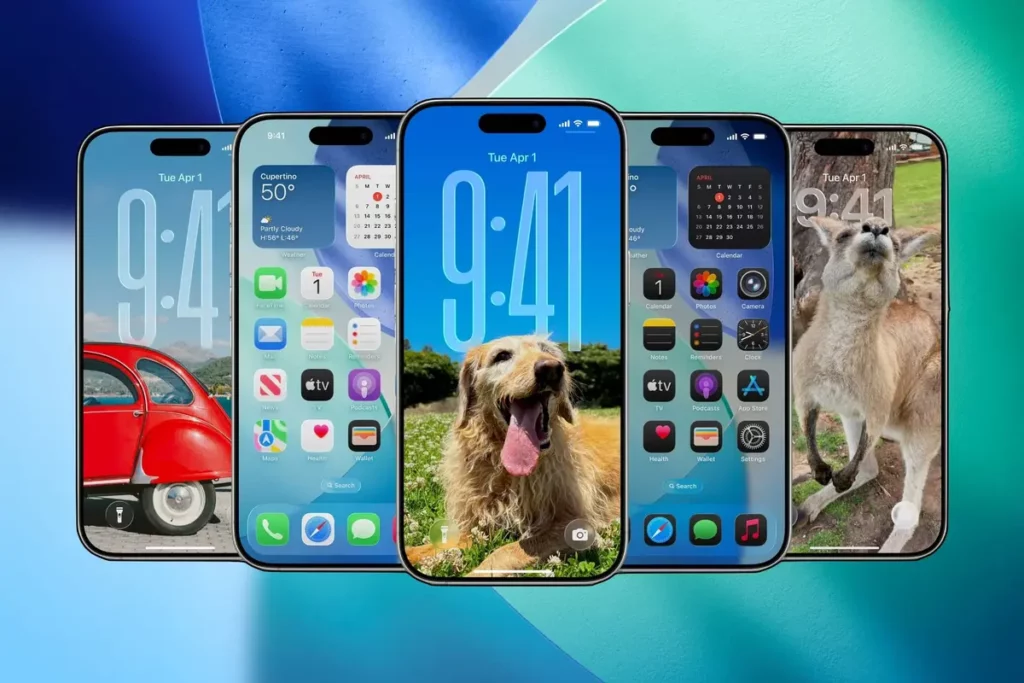
After 24 hours of iOS 26 beta installed on an iPhone 16 Pro, there are several new features and design decisions to analyze. Apple redesigned the iOS experience like never before. We have to go back to iOS 7 to find a similar user experience change like this.
It’s important to notice that iOS 26 beta is still evolving. There are different problems and issues like heating devices and errors. But the core of the user experience is still very interesting. In this article we explore what iOS 26 has to offer.
The best of iOS 26 beta
The new design language is called Liquid Glass and is one of the most interesting in recent years. It includes a hypnotizing effect that makes elements behave as real crystal, reflecting the surroundings. The design is present in every corner of the system.
Details are everywhere on Liquid Glass experience on the iOS 26 beta. If you slide the bar, it glows. The notifications bounce and there are lots of other small visual features. For example, transparent icons for Apple’s apps as well as other like ChatGPT, WhatsApp, Instagram or X. Even third party widgets become transparent automatically. The new iOS 26 beta has the power to take icons from other developers and reinterpret them using Liquid Glass style.
Apple has learned from experience. iOS 7 design changes took a lot before every developer included compatibility with it. But with the new iOS 26 beta experience the Liquid Glass experience is already working with the most important third party apps and services. Another advantage is that the operating system user experience is still friendly for those who recently arrive to iOS.
Messages revolution
Messages app improves through several new features. It now includes polls using Apple Intelligence integration. The app detects automatically when a poll may be useful and it can recommend you to create one. The app also includes some esthetical changes. You can use customized backgrounds for each conversation with images or videos. The only issue is battery life time but there are no specifications about this yet.
In the new iOS 26 beta there’s also a SMS spam filter. Similar to the e-mail app, now Messages can automatically put unknown numbers to a different folder. There you can identify friends or directly remove and prevent contact from spam numbers.
Apple Music AutoMix
AutoMix uses Artificial Intelligence to understand the real starting point of a song and the pauses. It also indicates when a song ends. Depending on the kind of music, it can create DJ like transitions to make a song last longer and conneting rythms. It’s like having a real DJ on your iPhone.
Photos intelligent downgrade
The new iOS 26 beta corrects one of the most criticized errors from iOS 18: the Photos app. Most navigation changes of iOS 18 have been reverted after hearing the user community. iOS 18 tried to make Photos seem more intelligent. You opened a photo and it granted you access to different moments from you daily life. But now you can navigate the interface faster and you will have two big tabs: Library and Collections.
- In Library you will find chronologically ordered all your gallery photos and videos.
- In Collections you can use all the Artificial Intelligence features to navigate different recommendations from your agenda.
Photos app also includes organization improvements. Special scenes will make you experience a round of creativity. If you enter a photo you can activate the 3D effect and thanks to AI the background and the main image can be separated in a few seconds.
Camera app simplicity and functionality
The Camera app is a total chaos since iOS 7. Thanks to the new iOS 26 beta you can use a cleaner interface with video and photo mode and a sliding bar to keep access to older features.
In the new Camera app you can quickly access some settings that were previously blocked. For example, you can change between 24 MP and 84 MP in just one touch. There are also Live photos creations, flash, aspect rate and other functions you can fully activate from the main interface.
iOS 26 beta features to be improved
The new iOS experience is far from perfect. Some users are confused with the Liquid Grass interface and the bouncing notifications. As different apps and messages appear bouncing, the chaotic experience of iOS 26 beta is visually predominant. Siri is another loss in the new iOS. There are no improvements for the assistant and we may expect changes for the near future.
It’s a funny and very complete experience. The changes are really deep and you may only have to wait for the official release. It’s new way to understand the user interface and the iOS experience. As a tip for those who want the new iOS beta, it’s better to wait for a stable and official version. The beta period means that some issues may appear when installing it in your phone or tablet. If you want to test it, there are no big risks. But the experience is pretty far from complete yet.