
With the continuous update of models and the development of technology, the current iPhone adopts powerful security measures to protect user data. So when your iPhone is accidentally locked, the difficult unlocking process can leave you unable to access data for a long time. Whether it is due to forgetting your password, disabled device, or inheriting an unidentified iPhone, a locked iPhone can bother your personal and professional life.
Apple offers to restore iPhones using iTunes to help users unlock their iPhones, but this traditional solution often forces users to make difficult choices: either regain access, but lose all data in the iPhone; or the iPhone can only be permanently locked.
Fortunately, an advanced iOS unlocker like FoneTool Unlocker, with your needs in mind, offer a smarter iPhone unlocking solution that can save data while removing various types of iPhone screen locks.
When You Need to Unlock Your iPhone?
Forgot your password is the most common reason why your iPhone is locked, but not the only reason. You may also be locked outside your iPhone because of the following situations:
- Disable iPhone after multiple failed attempts: After entering the password 6 wrongly, the delay time of the iPhone becomes longer and longer. If you fail to enter the correct password for more than 10, it may even cause the iPhone to be permanently disabled.
- Lock screen problem after update: iOS updates can sometimes trigger unexpected password verification failure.
- Used devices with previous owners’ locks: Many used iPhones did not remove the Apple ID of the previous user before they were sold.
- Forgot Screen Time Password: Parental Controls may accidentally lock the device owner, and if you forget your password, the Screen Time Password will not be accessible to all services and applications on your iPhone.
Remove iPhone Locks Without Passcode with FoneTool Unlocker
FoneTool Unlocker provides users with simple and reliable iPhone unlocking methods, and four key unlocking functions to solve the problem of iPhone access being restricted in all aspects:
1. Unlock iOS locked screen
Bypassing 4-bit/6-bit code, Touch ID and Face ID locks.
Works even on disabled iPhones.
If you do not enable Find My iPhone, you can retain data.
2. Remove Apple ID
Solved the issue related to “Find My iPhone”.
No need to seek help from previous owners.
3. Unlock Screen Time password and restrictions
Delete forgotten parental control restrictions.
Restore complete device functionality.
4. Bypass iTunes backup encryption
Access iTunes encrypted backup without password.
Recover data from password protected backup.
Extracting specific data without full recovery.
Next, follow this detailed guide on how to unlock your iPhone without password.
Preparation:
Download and install FoneTool Unlocker on your Windows PC. You need to prepare a USB cable to make sure that the iPhone can be connected to your PC. If a prompt pops up on the iPhone screen, click “Trust this computer” to allow the software to access your iPhone.
Step 1. Start FoneTool Unlocker on your Windows PC, select the Remove iOS Screen Passcode function, and click the Remove Now button in this section.
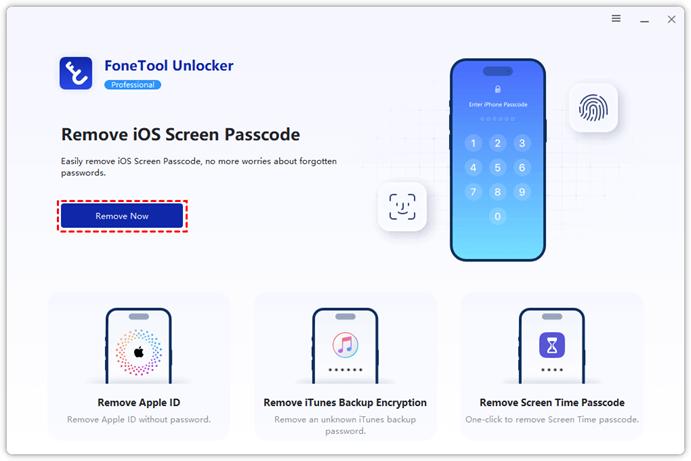
Tip: You can also choose three other features based on the unlocking needs – Remove Apple ID, Rmove iTunes Backup Encryption, and Remove Screen Time Passcode. The tool all provides detailed step-by-step instructions that will guide you to unlock the device correctly.
Step 2. In the next step, follow the instructions given on the screen to put your iPhone into Recovery mode.

Step 3. FoneTool Unlocker will automatically recognize your iPhone model and iOS version and get the necessary iOS firmware for your device, which you need to download.
Step 4. After the download is complete, click the Remove Now button in the lower right corner of the next interface to confirm that you start removing the iPhone screen lock.
When your iPhone is successfully unlocked, it will restart and you can reset it as a new device or restore your iPhone from a backup.
In the End
Free iPhone unlock software like FoneTool Unlocker provides users with targeted solutions, trying to ensure that users do not lose all their important data and easily regain access to their devices. It provides a huge help for users to unlock their iPhone. Additionally, we recommend that you do a complete erase by setting to avoid leaving an activation lock for the next owner before selling or recycling your iPhone.