
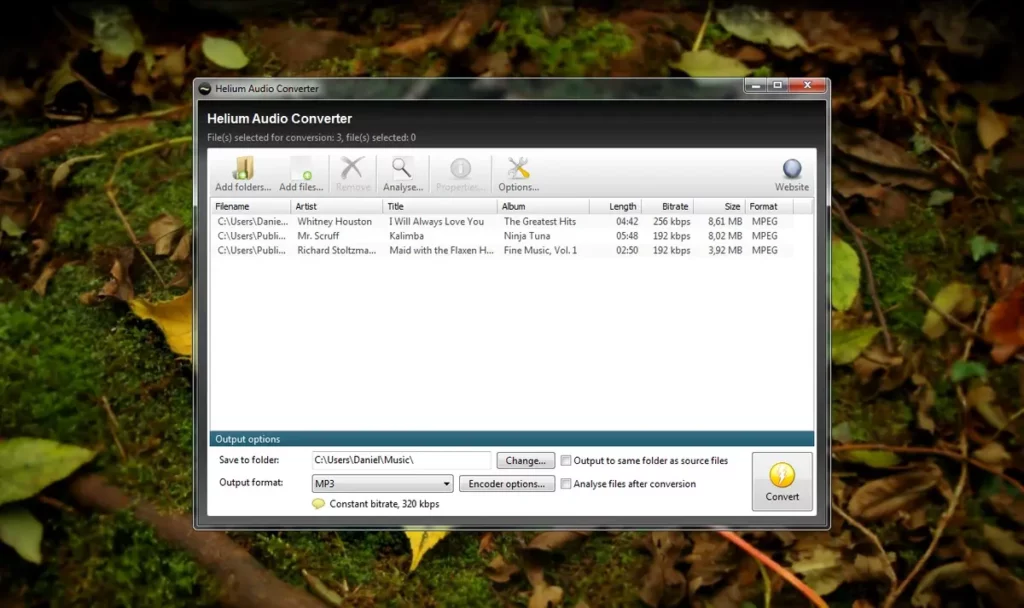
Working with several music formats at once is extremely useful, as well as image formats. Depending on the type of format, you can play your files with better quality / size relation for each device.
Imagine you need to use certain music formats for a presentation in video. You may find that your editor doesn’t run a specific type of audio format. But thanks to Helium converter you can all your music files to the most popular music formats with just one click. You can reproduce the songs un mobile phones, computers, tablets and a lot of other devices. There’s also the possibility of needing to share music files as e-mail attachment or via WhatsApp. Helium converter is your great ally in this.

The main features of Helium converter for music formats
The main advatange of Helium converter to work with all music formats is that the app is totally free. You only need to download it from the official website and start converting your music files. The app allows for fast and easy audio conversion. Basically you only need to load a file and select the output format. If you need to manage a big audio library, it’s a great tool for you to play all your files in almost any device. The complete list of main features of Helium converter includes:
- Compatibility with a wide variety of music formats.
- Direct conversion with the most popular audio output formats like MP3, WAV, ACC, FLAC and OGG.
- Simple and fast multimedia content processing.
- Multi file working support for batch conversion.
- Audio output quality settings with bit and sample rate included.
- Intuitive and easy to use interface.
- It saves metadata from each file: author, album and title.
How to use Helium converter and its main advatanges
After downloading Helium converter for free, you onyle need to select the output format for your music files. It’s extremely easy to use and you can learn the main features of each music formats and how to make the most out of them. The software solution is very light and you can run it in almost any computer in just a few seconds.
Compatible music formats with Helium converter
- FLAC. Lossless. Big size files. Saves music collection with CD quality and audio production.
- Wave (.WAV). Lossless. Very big size files. Professional audio edition, sound masters.
- MP3. Lossy. Excellent quality. Small size files. Mobile phones, cars, portable players. Great compatibility.
- M4A. Lossy. Excellent quality. Very small size files. Apple ecosystem for iPhone and iTunes. Streaming. Better quality than MP3 and the same bit rate.
- Ogg Vorbis. Lossy. Very good quality. Small size files. Open source alternative to MP3 and AAC. It’s used on Spotify.
- WMA. Lossy. Good quality. Small size files. Windows Media Player ecosystem.
The next step in the interface is a screen where you can select the files to convert. You can upload independent files or a folder with lots of them. Then you select the output format and you can check the metadata of every single file
It’s important to note that Helium coverter doesn’t work with DRM protected files. You will receive a Format error when trying to convert a file with Digital Right Management settings.