
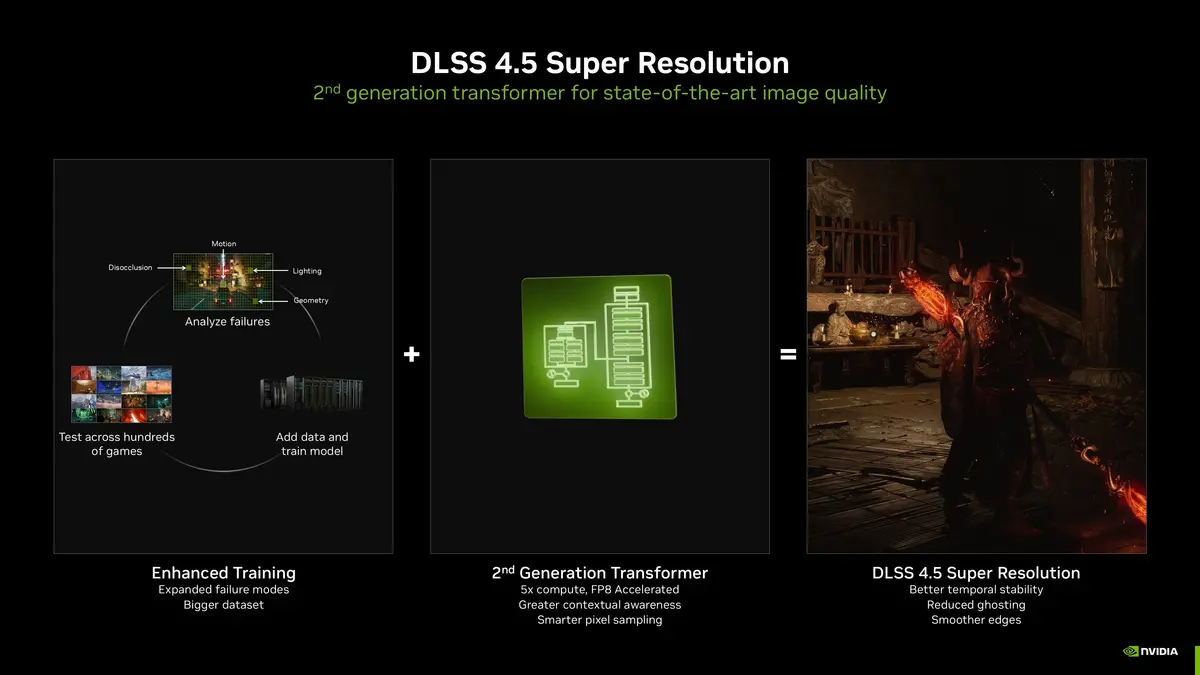
Recently, NVIDIA has released the DLSS 4.5 update for AI-based rendering technology and here you will learn how to activate it. Earlier versions focused only on boosting frame rates, but DLSS 4.5 combines performance and image quality improvements for one of the most significant upgrades for NVIDIA users in videogames.
Activate the DLSS 4.5 on a supported NVIDIA GPU to start enjoying sharper edges, more accurate lighting, reduced ghosting and better motion stability. And that’s only the beginning. The new AI model produces even clearer and more natural-looking visuals for you. Another advantage is that DLSS 4.5 is available not only for brand-new graphic cards but it’s also supported on every GeForce RTX thanks to NVIDIA app.
Main features to activate DLSS 4.5
- 2nd-generation Transformer AI model for an improved Super Resolution quality.
- 5 x higher computational investment in comparison with the original DLSS 4 Transformer.
- Native FP8 precision support for a high performance with minimal quality loss (GeForce RTX 20 and 30 Series GPUs don’t support this feature).
- Improved context-aware AI upscaling for a finer detail and better scene understanding.
- A smarter use of motion and pixel data for more accurate and precise video output.
- Dynamic 6x Multi Frame generation feature, exclusive for RTX 50 series GPUs.
- Linear color space processing for a more realistic lightning and reflections show.
- Backward compatibility with existing DLSS games via NVIDIA app.
How to activate DLSS 4.5 on your supported GPU
The steps to activate DLSS 4.5 in available GPU from NVIDIA are the following:
- Check if your GPU is compatible.
- Update the NVIDIA app.
- Install the latest NVIDIA Game Ready Driver.
- Enable DLSS 4.5 from the NVIDIA app menu.
Check GPU compatibility
The DLSS 4.5 relies on NVIDIA’s Tensor Cores, which are only available on the GeForce RTX graphics cards family. The feature won’t work on a GTX or older GPUs, even if the game supports DLSS.
The complete list of DLSS 4.5 compatible GPUs
- GeForce RTX 20 Series
- GeForce RTX 30 Series
- GeForce RTX 40 Series
- GeForce RTX 50 Series
Although all RTX generations support DLSS 4.5 Super Resolution, certain advanced features like Dynamic Multi Frame Generation and 6x Multi Frame Generation are exlcusive of the RTX 50 series GPUs.
- In order to check your own GPU on Windows 11, press Win + R and type dxdiag.
- The DirectX Diagnostic Tool window will open, switch to Display tab and look your GPU name under Device.
- In case your GPU model starts with RTX, then it’s compatible with DLSS 4.5.
Update the NVIDIA app
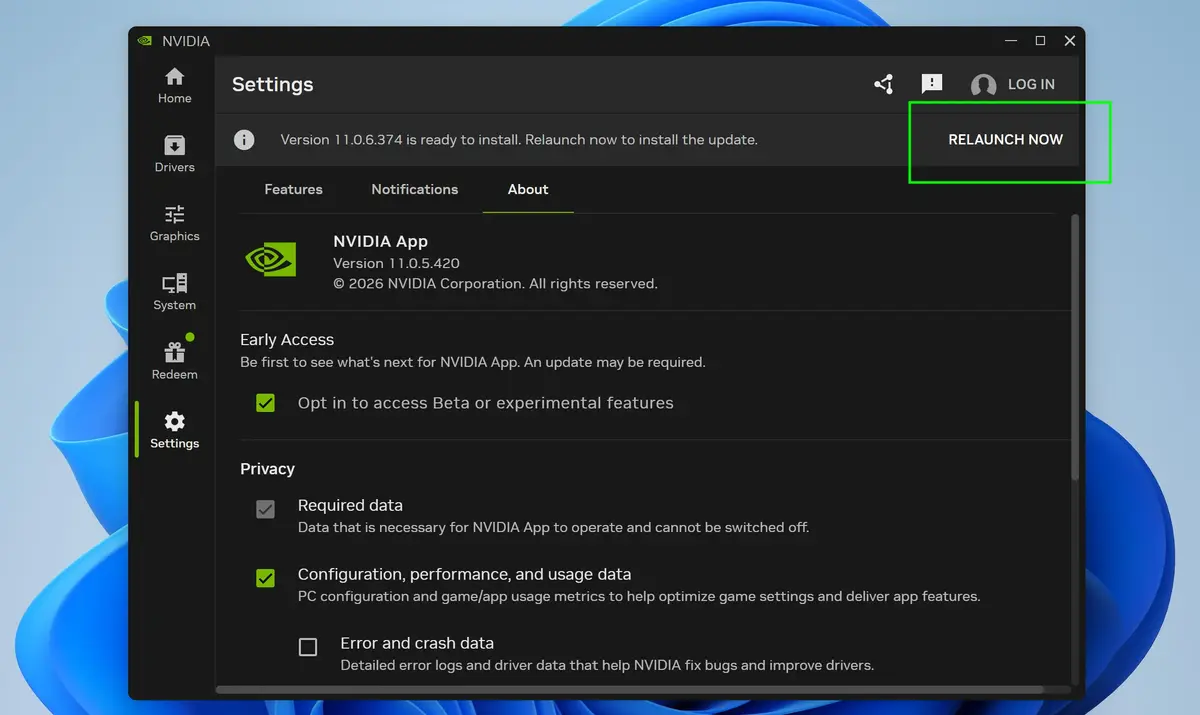
To make the most out of your NVIDIA GPU you have to update the NVIDIA app. DLSS 4.5 requires NVIDIA App version 11.06 or higher along with the latest GeForce Game Ready driver file. In order to check on your app version:
- Open the NVIDIA App.
- Go to settings in the left sidebar.
- Click on About.
- Check the version number listed on screen.
In case there’s a new version available, the app will automatically download and apply it for the next time you launch it.
Install NVIDIA Game Ready Driver
In order for DLSS 4.5 to work correctly, you need to make sure that the latest driver version for your GPU is running. The rollout is tied to GeForce Game Ready Driver 591.74 or higher.
- Open the NVIDIA app.
- Select Drivers on the left sidebar.
- Download and install the latest Game Ready Driver version.
- Restart your PC after installation is complete.
Activate DLSS 4.5 with the NVIDIA app
Once you have updated your NVIDIA Game Ready Driver it’s time to enable the DLSS 4.5 function on a supported GPU. It’s possible to activate DLSS 4.5 globally or fine-tune in each game individually.
Enable DLSS 4.5 in each game
- Open Graphics – Program Settings.
- Select the game to tune.
- Click on the edit icon next to DLSS Override – Model Presets.
- Select Recommended and press Apply.
The new Recommended option replaces “Latest” and aligns with the two new DLSS 4.5 Resolution models: Model M and Model L. It sets Present M for DLSS Performance mode and Preset L to DLSS Ultra Performante mode. The remaining modes are Preset K.
In case you choose Custom under DLSS Override – Model Presets you can manually select the DLSS model. NVIDIA recommends per-game tuning for now, as a lot of titles don’t yet have the full native support for DLSS 4.5.
Activate DLSS 4.5 Globally
- Open the NVIDIA App and go to Graphics – Global Settings.
- Scroll down to DLSS Overrides.
- Click on the edit icon and select DLSS Override – Model Presets.
- Select Recommended and Apply.
How do DLSS 4.5 Model Presets work?
The Preset M is optimized for Performance Mode. It’s the flagship DLSS 4.5model built on the second-generation transformer architecture. It was designed to deliver the biggest image quality improvement for Performance mode. Fewer real pixels are rendered.
- It’s best for 1080p to 4K upscaling and high-FPS gaming.
- It delivers sharper detail, reduced ghosting and better edge clarity.
- It also works in Quality, Balanced and DLAA modes.
- The most recommended mode for a true DLSS 4.5 experience.
Present L mode for Ultra Performance
This Preset is specific for 4K and 8K Ultra Performance mode. The base render resolution is extremely low.
- Best for 4K/8K displays and Ultra Performance enabled.
- Higher frame rates at extreme resolutions.
- Slightly softer image than Preset M setting.
- Improvements over DLSS 4.0 modes.
Will DLSS 4.5 run in 40 series?
Yes. The DLSS 4.5 is fully compatible with NVIDIA RTX 40-series GPUs. However, it won’t support the new Dynamic or 6x Multi Frame Generation features, those are exclusive for the RTX 50 family. But it still benefits greatly from the image quality improvements with the latest driver and NVIDIA App.
The new DLSS 4.5 Super Resolution is available and you can activate it on all NVIDIA GeForce RTX GPUs including RTX 20, 30, 40 and 50 series.
Do you have any questions or problems related to the topic of the article? We want to help you.
Leave a comment with your problem or question. We read and respond to all comments, although sometimes it may take a while due to the volume we receive. Additionally, if your question inspires the writing of an article, we will notify you by email when we publish it.
*We moderate comments to avoid spam.
Thank you for enrich our community with your participation!