
If you are the owner of a Google Pixel it’s probable that you are experiencing an Android blue dot since the Pixel Drop from March 2026. The blue dot appears in the upper right corner of your screen when you open certain apps such as Instagram or WhatsApp.
The confusion among users in forums because of the Android blue dot has been revealed. It’s not a pending notification but a security reminder. The new Android blue dot is a security and privacy reminder and it’s among the new features of Android 16.
What does the new Android blue dot means?
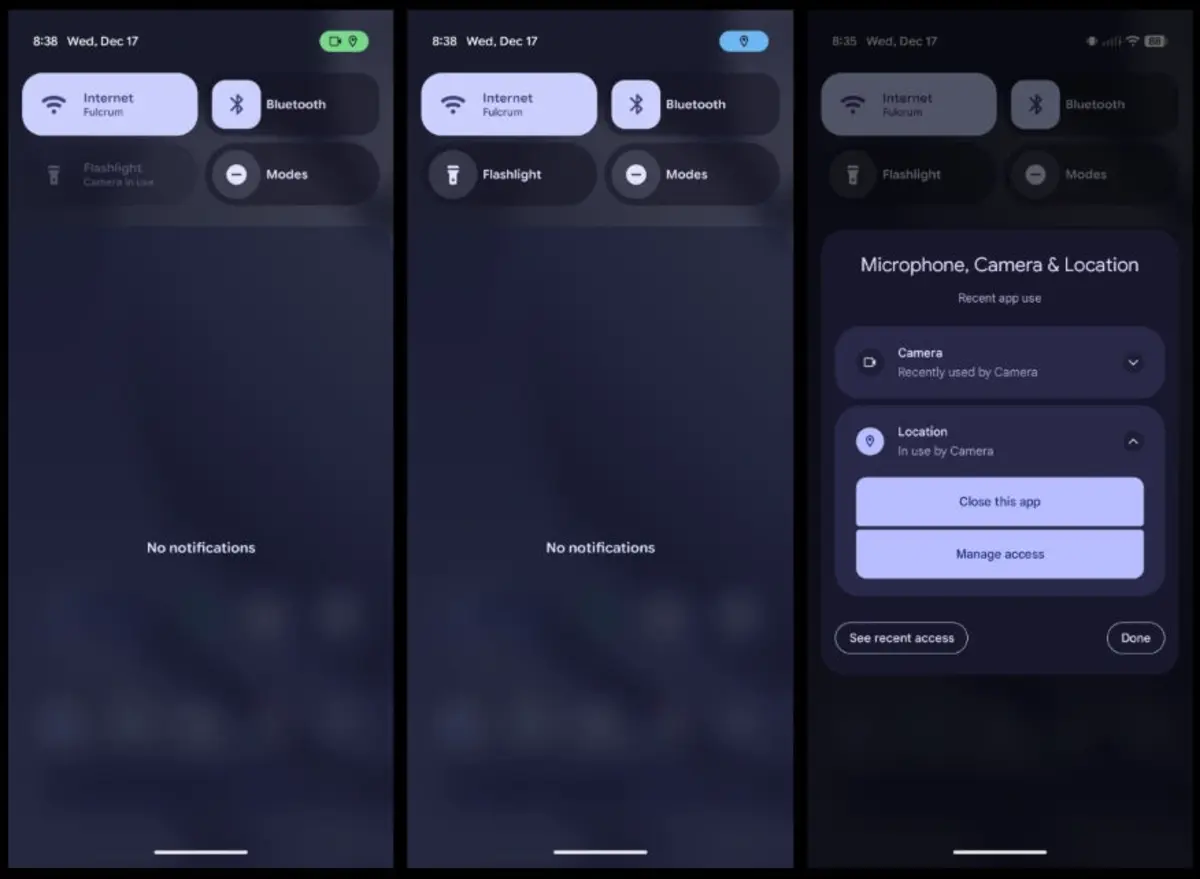
When any app accesses your camera or microphone, a green dot indicates that the features are active. The new Android blue dot indicates that your location GPS device is being used. Thanks to the new Android 16 and the latest Pixel Drop, Google unified the visual language to use a color system in the upper right corner. That way, the user can learn at a glance which functions of the phone are being used.
The new Android color system indicates the following:
- Blue dot. NFC and GPS services running.
- Green dot. Microphone and camera features running.
Why does the Android blue dot only appears in WhatsApp and Instagram?
Apps like Instagram and WhatsApp usually access your location and GPS services in order to share that information. You must give them access first but most of the users have already given permission at the first installation.
WhatsApp shares your location in a conversation if you want to, and Instagram requires your location in order to show you adds geographically close to you. None of these apps are tracking your location randomly. If you open Google Maps it also has a blue dot because it requires GPS location services to run correctly.
The blue dot is not only a reminder
Starting with the newest Android update, both the green and blue dot are interactive. If you slide down the notification panel when one of the dots is active, you can check which app is running it. It’s also possible to access the Privacy panel and manage permissions of different apps.
List of Android devices compatible with the new Android blue dot
The new privacy blue dot is not available in every Android device, at least not now. Right now it’s only a Google Pixel exclusive feature but in time it will arrive in other devices too.
- Google Pixel 10 Pro Fold
- Google Pixel 10 Pro XL
- Google Pixel 10 Pro
- Google Pixel 10
- Google Pixel 10a
- Google Pixel 9 Pro XL
- Google Pixel 9 Pro Fold
- Google Pixel 9 Pro
- Google Pixel 9
- Google Pixel 9a
- Google Pixel 8 Pro
- Google Pixel 8
- Google Pixel 8a
- Google Pixel 7 Pro
- Google Pixel 7
- Google Pixel 7a
- Google Pixel 6 Pro
- Google Pixel 6
- Google Pixel 6a
- Pixel Pro Fold